Edit Listing Information
After creating your listing, you can click Edit to access additional options that are not available during the initial creation process.
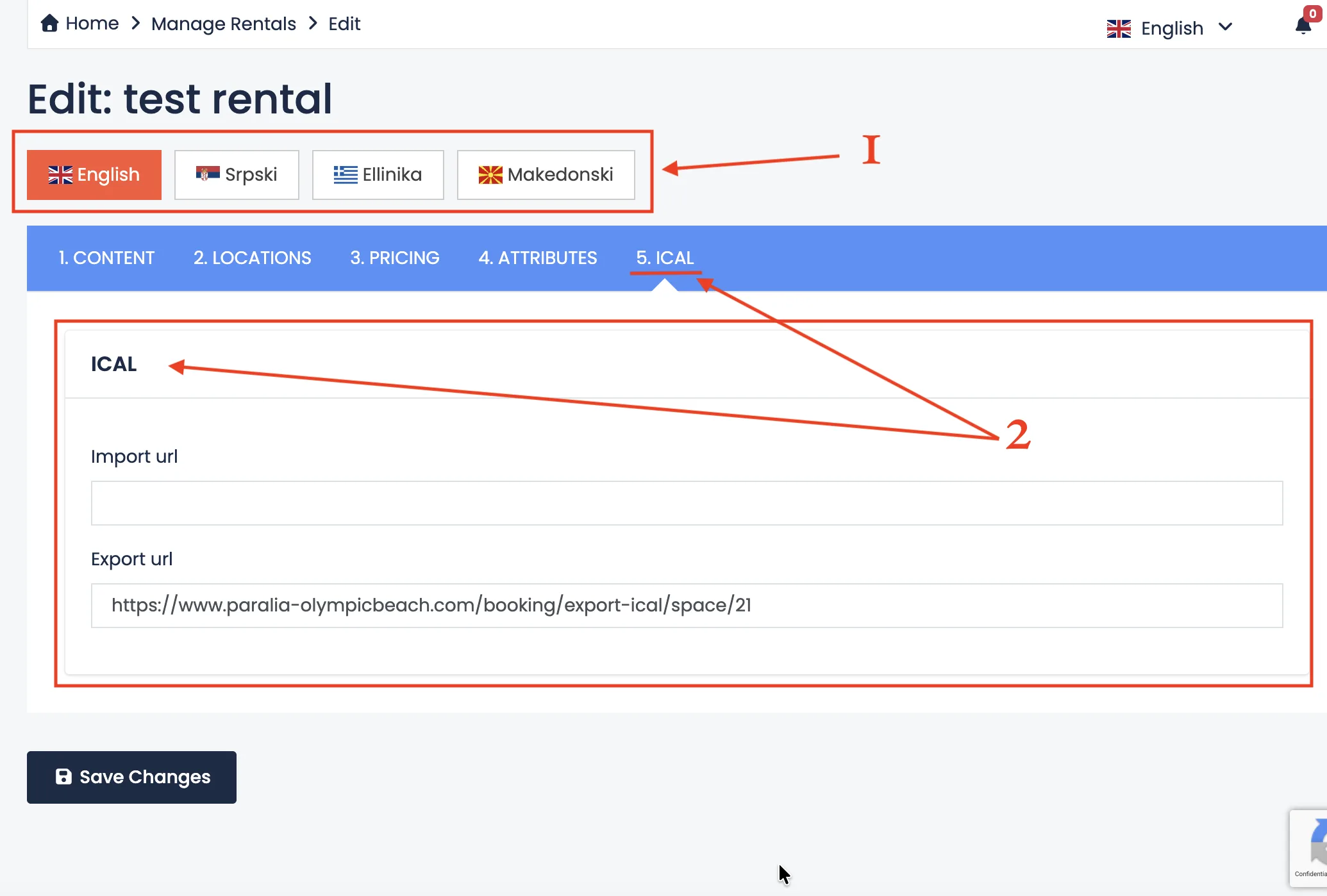
Inside the edit page, you will see two important sections:
- Language Variations
- iCal Synchronization
1. Language Variations
The language variation section allows you to manually customize specific content for each available language.
You only need to translate the following fields:
- Listing Title
- Listing Description
- Hotel Policy / FAQs (house rules for hotels or faqs for rentals)
All other system fields are translated automatically by the platform. These three sections are personalized content and must be translated manually.
You may use professional translators, online translation tools, or AI translation services to help you. However, make sure the final text sounds natural and clear.
Language variations do not have to be identical. You can slightly adapt the tone or structure depending on the audience. For example, different languages may emphasize different benefits of your property.
Having properly translated content significantly increases your visibility and helps you reach a wider international audience. Listings available in multiple languages generally perform better and build more trust.
2. iCal Synchronization
The iCal section allows you to synchronize your availability calendar with other booking platforms.
This helps prevent double bookings and keeps your calendar automatically updated across different systems.
To learn how to import and export iCal links and connect your listing with other platforms, please read:
Sync Calendar with Other Platforms
Regularly reviewing and updating your listing information ensures accuracy, improves guest experience and increases your booking potential.